

Publish a site and work with other builders
Ce contenu n’est pas encore disponible dans votre langue.
For builders ready to put a site in front of a business.
It covers what is saved where, publishing with git commit and ws push, working on a site from a second computer, and what happens when two people change it. At the end, Saltmere Marina’s first version is published, a second builder has the site on their own computer, and both have changed it without losing each other’s work.
What is saved where
Section titled “What is saved where”The site’s folder is a Git clone. The platform holds the site’s repository. Publishing is a push of your commit, which the platform checks and then adds to the repository’s main branch. Until you push, your work is only in your folder.
- Only on your computer: every change since your last push. A lost or broken laptop loses it.
- On the platform, from each push: your pushed commits. Each push publishes, makes a version and moves
mainto your commit.git logshows every commit andws versionslists the versions. Edits the owner makes in the owner panel arrive as commits by Website Strategy, with the owner’s name in the message. - On the platform at once: a setting changed with
ws site, and a live source connected withws sources connect. Before the first publish, settings are saved for version 1. After it, a setting change makes a new version. - Not a copy of your work: a preview.
ws previewsends your files to build the preview, but no command brings them back. Its pages are removed when its link ends, 7 days after the lastws previewunlessws site --preview-expireschanged it. - Deleted when its link ends: an unsold sample. Its link ends 30 days after the last publish unless
ws site --expireschanged it. The platform then deletes the sample with all its versions. A bought site keeps its versions.
So push when you stop for the day, if the work is ready for the people who have the site’s link. Work that is not ready stays in the folder, or on a Git branch you keep on your own computer.
ws new makes the folder with git init already done, so you never set up a repository. Commit as you like, then ws push. ws keeps its own state in .ws/, which Git already ignores in this clone: it holds this folder’s preview ID and changes waiting for an owner’s approval. Leave it out of commits.
1. Publish
Section titled “1. Publish”git add -A && git commit -m "First version"ws pushBuilt 8 pages.Published version 1 of "Saltmere Marina".
Private link to the sample, open to anyone with it until December 14:https://saltmere-marina-k7f3q9.sitepeek.page/?key=Vq3x9Lm2Tz8RkP4wNc7bYd
Automatic checks are running. Run ws status for the result.While it works, ws push also prints progress lines, such as Building the site. and Running the publish checks., which the examples in this guide leave out.
ws push pushes the commit you have checked out to your own branch under push/ in the site’s repository, never to main. The platform builds and checks that commit, moves main to it once the version is saved, and ws push prints the sample’s private link as soon as the version is saved. Inside a clone, ws publish does the same: it pushes. Later publishes keep the same link, and ws site shows it too.
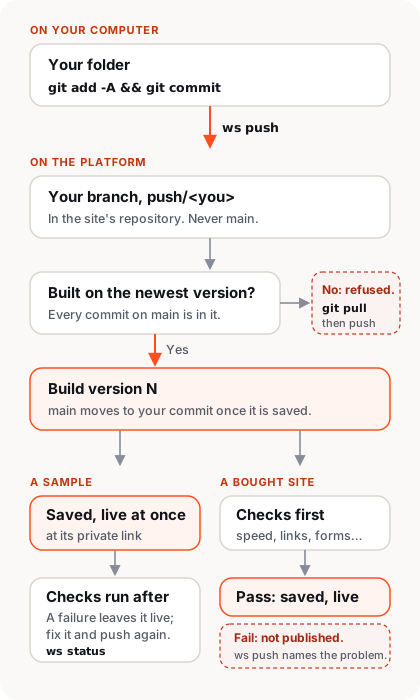
Publishing makes a new version: a saved copy of every file in the commit and of the site’s settings, such as its languages, numbered from 1. The published version is the one visitors see. The commit message is the version’s note, shown later in ws versions. ws push publishes the commit you have checked out, and refuses while any file has changes you have not committed:
ws pushCommit your changes first: git add -A && git commitRun git status --short before publishing to see what is not committed yet. Your preview link from ws preview keeps showing your own work in progress.
If the connection ends before ws push hears back, it says so and that it cannot tell whether the version was saved. Run ws push again: it shows the version if it was saved, or publishes it now.
What the automatic checks do
Section titled “What the automatic checks do”The platform checks page speed, accessibility, links, test entries through forms, and missing text in any language. The speed check measures again when the platform is busy, so a busy moment never stops a publish.
- On a sample, the version goes live first. Its checks run in the background and take a few minutes, and
ws statusshows the result for the newest version, with how long its checks have run so far. Publishing again before they finish ends the older version’s checks: only the newest version is checked. If a check fails, the sample stays live. The result names the problem, so the builder can fix it and publish again. - Before staff mark a sample bought, its live version must pass the checks.
- On a bought site, the checks must pass before each new version goes live, even before the site has its own domain. While the command waits, it shows its progress. Attaching a domain builds and checks a new version for that address before visitors can use it.
Outside link problems appear as warnings with the file and line, and the version still publishes. When an outside link check runs out of time, its warning says “not checked in time.” A link that names the site’s own domain is a warning on a sample and stops the publish on a bought site (part 3).
How a sample becomes the business’s site
Section titled “How a sample becomes the business’s site”A site starts as a free sample made for a business that is not a customer yet. Until the business buys it, by signing up and paying for hosting, the sample is at its subdomain followed by six random letters and numbers on our preview domain: saltmere-marina-k7f3q9.sitepeek.page. The random part means nobody can find the sample by guessing its address, and only people with the link can open it. The link lasts 30 days from the last publish. When it ends, the link stops working and the unsold sample is deleted. To keep a sample longer, run ws site --expires 60d.
When the business buys its site, staff choose Mark as bought on the ops panel at ops.websitestrategy.com, where staff manage every site, and name the owner. Then staff attach the business’s own domain, such as saltmeremarina.ca. The business’s part is:
- The business adds the DNS-only CNAME shown in the ops panel. A subdomain such as
www.saltmeremarina.causes a DNS-only CNAME. For a root domain such assaltmeremarina.ca, the DNS provider needs to offer a flattened CNAME or ALIAS. If flattening hides the target, the business also adds the TXT proof shown in the ops panel. - When the panel shows Active, open the domain over HTTPS.
From then on, ws push prints that address, and the sitepeek.page address forwards to it.
How visits are counted
Section titled “How visits are counted”The platform counts each page view on its servers as the page is served, with no script and no cookie. If the owner connects Google Analytics 4 or PostHog under Visits in the owner panel, the platform adds it to every public page (Reference). Builders add no analytics tags.
2. Work on the site from another computer
Section titled “2. Work on the site from another computer”Riley Park wants to add a news post from another laptop. Riley runs ws clone with the site’s subdomain:
ws clone saltmere-marinaYou are not signed in. Opening https://outport.app in your browser to sign in.Signed in as Riley Park.Cloned saltmere-marina to saltmere-marina.cd saltmere-marinaThe new folder is a Git clone with the site’s whole history. ws clone never writes into a folder that already exists. Work not pushed from another computer stays on that computer. You never type a Git password: Git asks ws for a short-lived one through ws git-credential, which is set up in the clone. Riley adds a post about winter storage:
---title: Book winter storage nowdate: 2026-11-14slug: winter-storage---We haul boats out from November 20. Ask at the office to book a spot.That is _data/news/2026-11-14-winter-storage.md. The coding agent Riley works with writes the French copy, _data/fr/news/2026-11-14-winter-storage.md, with the French title, slug: hivernage and the French text. Then Riley publishes:
git add -A && git commit -m "News: winter storage"ws pushBuilt 10 pages.Published version 2 of "Saltmere Marina".
Sample link: https://saltmere-marina-k7f3q9.sitepeek.page/?key=Vq3x9Lm2Tz8RkP4wNc7bYd
Automatic checks are running. Run ws status for the result.
3. When someone else published first
Section titled “3. When someone else published first”Meanwhile, in a folder that still holds version 1, Jordan adds the year the marina opened to the footer, so © 2026 becomes © 1987–2026. Jordan commits and pushes, and the push is refused, because Riley’s commit is already on main:
git add -A && git commit -m "Footer change"ws pushNot published: someone published first. Run git pull, then ws push.git pullMerge made by the 'ort' strategy. _data/fr/news/2026-11-14-winter-storage.md | 5 +++++ _data/news/2026-11-14-winter-storage.md | 5 +++++ws pushBuilt 10 pages.Published version 3 of "Saltmere Marina".The folder now holds version 3: Riley’s post and Jordan’s footer. The platform publishes only a commit that builds on the newest version, so nobody overwrites work they have not seen. It makes this check when it saves the version, so if two people push at the same moment, the second push is refused and the second person pulls and pushes again.
git pull writes over a file Git ignores when someone else committed a file at that path, so keep files that stay on your computer at paths .gitignore lists, such as dot files and node_modules. ws push refuses a commit that holds those paths.
The owner’s edits count as someone else too. When the owner changes a page in the owner panel, the platform commits it to main, and the next push from any builder’s folder is refused until git pull. In git log the commit is by Website Strategy, with the owner’s name in the message (part 7).
4. When both of you changed the same file
Section titled “4. When both of you changed the same file”Suppose Riley had also changed the footer in version 2. Then git pull stops, because only a person can choose between the two. These merges are Git’s own, so everything you know about Git applies:
git pullAuto-merging _includes/footer.htmlCONFLICT (content): Merge conflict in _includes/footer.htmlAutomatic merge failed; fix conflicts and then commit the result.Where you both changed the same lines, Git keeps both and marks them inside the file:
<<<<<<< HEAD <p>© 1987–{{ "now" | date: "%Y" }} {{ site.name }}</p>======= <p>© {{ "now" | date: "%Y" }} {{ site.name }}, Saltmere NS</p>>>>>>>> a41c9e2Pick one, remove the markers, then finish and push:
git add -A && git commit -m "Merge version 2"ws pushThe platform refuses a commit with a marker left in a file, and names the file. A photo or other file that is not text cannot hold markers: Git asks you to choose a side with git checkout --ours or --theirs. The Reference lists each case.
Check where a folder stands
Section titled “Check where a folder stands”ws status shows which version the folder holds, whether main has newer commits, and whether the folder has commits you have not pushed or changes you have not committed. git status lists the files. It also shows the checks for the newest version:
ws status"Saltmere Marina" (saltmere-marina)This clone is missing published commits from version 2. Run git pull.There are unpublished commits.There are uncommitted changes.Version 2 passed checks: speed, accessibility, links, forms, translations.